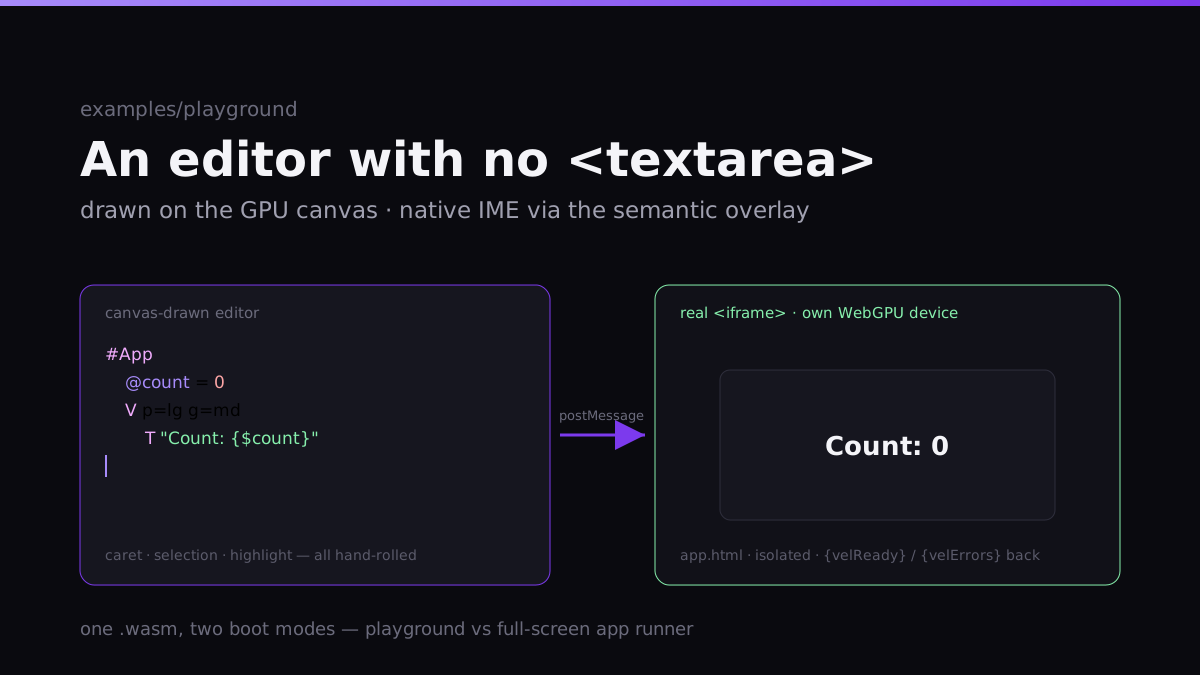
The obvious way to build an in-browser code editor is a <textarea> (or CodeMirror, or Monaco) on the left and your rendered output on the right. The Vel playground doesn't do that. The editor on the left is drawn — it's Vel widgets rendering text, a caret, and selection onto the same GPU canvas as everything else. There is no DOM text input you can see.
That sounds like masochism. Here's why it's the right call, and what it costs.
Why draw the editor
The playground is a single WebGPU canvas. The moment you drop a <textarea> into it, you have two rendering systems fighting: the browser lays out and rasterizes the textarea its way (its own font metrics, its own subpixel rules, its own scrollbar), and Vel renders everything else its way. They don't match. They especially don't match when you zoom — the canvas content re-rasterizes crisply at the new device-pixel ratio, and the textarea does whatever the browser feels like. You get a seam right down the middle of your tool.
Drawing the editor keeps it one scene. The editor (CodeEditor.cpp) is a Vel widget like any other: it measures and paints syntax-highlighted text through the same FreeType atlas as the rest of the UI, so it's pixel-consistent and stays sharp at any zoom. It scrolls with the same machinery, themes with the same tokens, and lives inside a Splitter next to the preview. One renderer, one look, one zoom behavior.
It also keeps focus sane. With a real WebGPU canvas as the app surface, you want keyboard events going to the canvas, not getting eaten by a DOM input layered on top. The editor handles keys directly.
The cost: you own everything a textarea gave you for free
This is the honest part. A <textarea> is decades of accumulated text-editing behavior you stop getting the instant you draw your own:
- Caret and selection. Where's the cursor, in glyph terms? Click-to-place has to hit-test against measured glyph advances. Shift-arrow and click-drag selection, selection across wrapped lines, the highlight rectangles — all hand-rolled.
- Syntax highlighting. The editor tokenizes
.veland colors it as it draws. That's not a plugin; it's part of the paint. - IME and clipboard. This is where I don't reinvent the wheel — I lean on the semantic layer. The editor projects a
TextAreasemantic node, and the accessibility mirror mounts a real, invisible overlay input on it. So CJK composition, dictation, and the OS clipboard go through the browser's native machinery on a hidden element, while the canvas renders the visible caret and selection. Drawn surface, native input — you can have both, but only because that projection already existed.
If I'd had to build IME from scratch in C++, this would not have been worth it. The fact that the accessibility work already solved native text input is what made a canvas editor affordable.
One WASM, two boot modes
The neat structural trick: the playground and the live preview are the same WebAssembly binary, booted two different ways. playground_main.cpp checks a flag the host sets on window:
index.html→ no flag → boots the full playground (editor + console + preview chrome).app.html→ sets__velAppMode = 1→ boots as a bare app runner that renders a single.velfull-screen.
So I ship one .wasm and get both the IDE and the app host out of it. No second build, no divergence.
And the preview pane is the part I'm happiest with: it's not a canvas-in-a-canvas emulation. It's a real nested <iframe src=app.html> with its own WebGPU device, mounted via an HtmlView widget. The editor streams your source into it over postMessage; the iframe compiles and renders it, and posts back {velReady} on boot and {velErrors} if compilation fails. That isolation is genuinely useful — your code runs in its own browser context, so a runaway loop or a crash in the previewed app can't take the playground down with it. (This is only possible because the web build needs no cross-origin-isolation headers — a require-corp policy would have blocked the nested iframe.)
The same app.html#src=<base64> URL that the preview iframe uses is also what the Share button generates: a standalone, hosted-app link to whatever you wrote. The preview and the share target are the same code path.
Capturing logs from inside the engine
One smaller thing that took more thought than expected: the console tab shows live engine logs. But Vel logs through spdlog, and spdlog is a private dependency of libvel — it's not in the public headers, so the playground can't just attach a sink to it from outside.
The fix was to put the capture inside the library: vel::log installs a custom spdlog sink, and exposes a spdlog-free API (recent() / generation()) that the playground polls. So the engine keeps spdlog encapsulated, and the playground gets a live log feed without ever linking against spdlog itself. The console's other tab — Problems — is fed by the {velErrors} messages coming back from the preview iframe. Two log streams, one panel.
A 0.5s debounce on the editor's change events drives the recompile, so typing doesn't trigger a rebuild on every keystroke — it waits for you to pause.
Was it worth it?
For a general-purpose web app: no. If you need a text editor on a web page and you're not already rendering everything on a canvas, use Monaco and move on. Reimplementing selection semantics and clipboard behavior is a tax most projects shouldn't pay.
For this — a tool whose entire point is showing off a GPU UI engine, where the editor and the thing being edited should look like they belong to the same program — it's exactly right. The editor is the engine drawing itself. And the pieces that would've made it prohibitive (native IME, crisp HiDPI text, header-free iframe embedding) were already built for other reasons, so the editor mostly just composed them.
That's the recurring shape of this whole project, honestly: the expensive capability you build for one reason turns out to be the thing that makes the next feature cheap.